VueScan Adds JPEG-XL and PNG Output Formats for Better Scans and Smaller Files

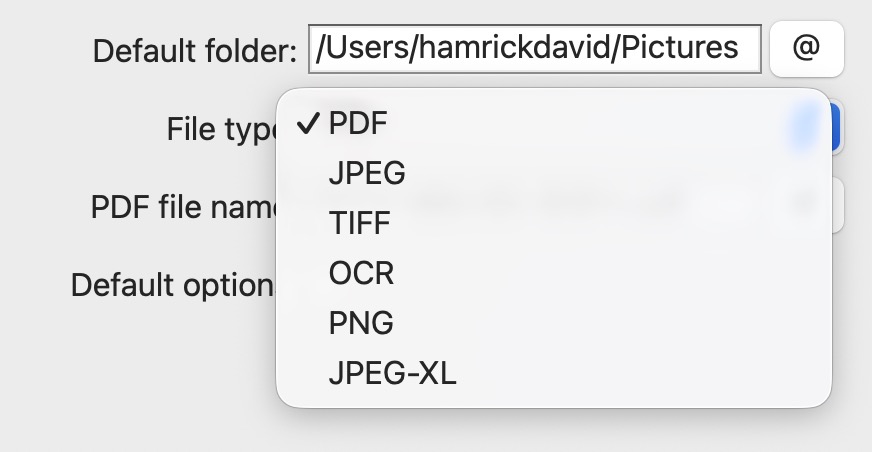
VueScan 9.8.51 adds two new output formats: JPEG-XL and PNG. Both are available for output files and raw files, so you can use them anywhere you previously used JPEG or TIFF. To select them, go to the Output tab and change Output file type or Raw file type to your preferred format.
What is JPEG-XL?
JPEG-XL (.jxl) is a next-generation image format designed to eventually replace both JPEG and TIFF for many use cases. It was developed by the JPEG committee—the same standards body behind the original JPEG format—so it carries the weight of an established international standard.
What makes JPEG-XL especially interesting for scanning is its flexibility:
- Lossy compression that produces files roughly 60% smaller than JPEG at equivalent visual quality.
- Lossless compression that produces files significantly smaller than TIFF—the same pixel-perfect preservation in a fraction of the space.
- High bit depth support (16-bit and 32-bit), preserving the full tonal range captured by your scanner.
- HDR and wide color gamut support, important for film and slide scanning where colors can extend beyond sRGB.
One format that handles both lossy and lossless, works at any bit depth, and produces smaller files than what you’ve been using.
A note on compatibility: JPEG-XL is still a newer format. Some image viewers and web browsers don’t support it yet. If you need to open your scans in older software or share them widely, stick with JPEG or PNG. But for your own archive—where long-term quality matters more than immediate compatibility—JPEG-XL is the best option available today.
What is PNG?
PNG is a lossless format—every pixel is preserved exactly as scanned, with no compression artifacts. If you’ve ever opened a JPEG and noticed blurry edges around text or fine lines, you know why lossless matters.
- Universal compatibility. Every image viewer, browser, and editor on every platform supports PNG. You’ll never have trouble opening a PNG file.
- Lossless quality. What your scanner captures is exactly what gets saved.
- Ideal for documents and text. Receipts, forms, business cards—PNG preserves crisp lines and sharp edges where JPEG would introduce artifacts.
PNG files are larger than JPEG, but for documents and line art the lossless quality is worth it. And unlike TIFF, PNG is understood by every application without plugins or special software.
Edition Requirements
PNG output is available in the Standard and Professional editions of VueScan. JPEG-XL output requires the Professional Edition. You can experiment with both formats in the trial version, but output files will include a watermark until you upgrade.
When to Use Each Format
VueScan now gives you five output formats. Here’s a quick guide to choosing the right one:
-
JPEG-XL — Best for archiving photos and film scans, long-term digital preservation, HDR and wide-gamut scans, and modern workflows where you want the smallest possible files without sacrificing quality. If you’re building a scan archive today that you want to last, JPEG-XL is the format to choose.
-
PNG — Best for documents, receipts, line art, text, and any scan where universal compatibility is a priority. Every device and application can open PNG files, making it a safe and reliable choice.
-
JPEG — Still great for quick scans you want to share online, import into older software, or store when file size matters more than pixel-perfect quality. JPEG remains the most widely used image format in the world.
-
TIFF — Still the standard choice for professional archival pipelines and Photoshop editing workflows. If your workflow already relies on TIFF, it continues to work well.
-
PDF — Still the best choice for multi-page documents, OCR workflows, and files you plan to share or print. PDF is the universal document format.
Get Started
JPEG-XL and PNG are available now in VueScan 9.8.51. Update to the latest version, go to the Output tab, and try them out on your next scan. If you’ve been using TIFF for archival scans, JPEG-XL lossless is a drop-in replacement that saves significant storage. And if you’ve been using JPEG for documents, give PNG a try—you’ll see the difference in text sharpness immediately.